
Do you support customers who work with onboard? In this article, you will find helpful information about the possibilities that onboard offers our mutual customers.
What does onboard offer?
With onboard, customers can easily and conveniently create their job advertisements digitally and publish them on various channels using the software. We offer a wide range of technical interfaces to various job portals for this purpose. We also offer various options for connecting to the customer’s career page.
Incoming applications from different channels land directly in onboard and can be processed here by the customer. Communication with applicants also takes place via onboard.
Customers have access to comprehensive statistics in onboard and can analyze this data to review and optimize their application process at any time.
Customer’s CI
Elements of the customer’s corporate design are stored in the software. Both the customer’s logo and an individual color code (spot colors only) are stored. This affects not only the color design of the software, but also the “Apply now” button in the job ads.
The individual color code is set up for the customer by the support team. To do this, please contact [email protected].
In addition, individual images can be uploaded to onboard, which are part of the layout of the job advertisements.
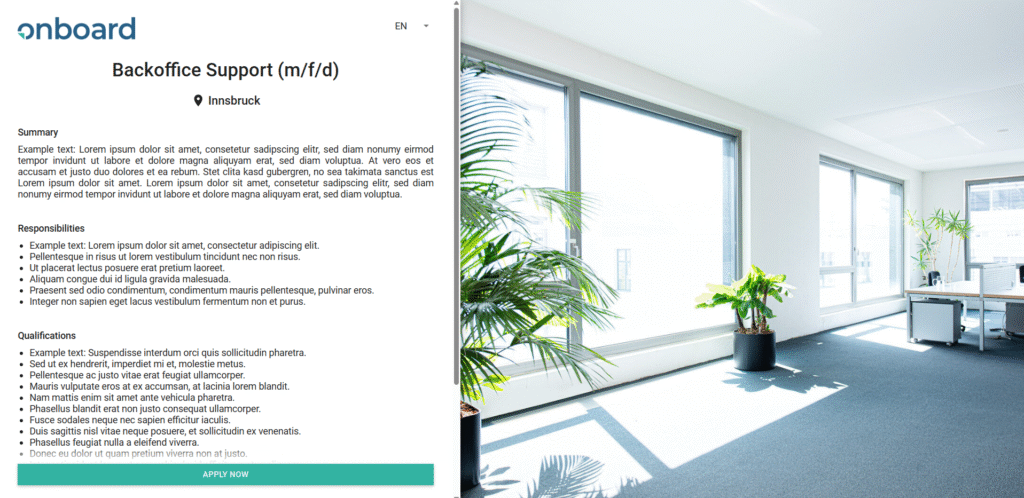
Logo
Format:
PNG, SVG oder JPEG
Resolution:
as large as possible, at least 600px wide
Background image
Format:
JPEG
Resolution:
optimal 1920x1080px
Size:
maximum approx. 2 MB
Options for linking to the career page
Connection via iFrame code
The creation of an iFrame code is included in the customer’s package. The customer chooses how the job ads are displayed, and we implement this according to their wishes. When designing, we take the customer’s existing website as a basis and adapt it to their corporate design.
Connection via API interface
It is possible to connect the customer’s career page to onboard via an API interface. Our existing interface can be used for this purpose.
Designing job advertisements
Our customers have many design options available to them when creating job advertisements:
- Videos and media files
– Videos from YouTube and Vimeo are supported as sources.
– The position, size, and orientation of the video can be selected individually. - Images and graphic elements
– Images and graphic elements can be integrated using the source code.
The onboard Customer Success Team is happy to provide advice and assistance with any questions you may have about integration ([email protected]). - Links
– Links to external content can be used to provide further information. - Attachments
– he most common file formats, such as PDF, .jpg, .png, .xlsx, etc., are supported for uploading attachments. - -> Here you will find a sample job advertisement with the various design options.
Additional options that can be implemented for the customer by the Customer Success Team include:
– Centering the logo
– Customizing the font color
– Customizing the font
– Customizing the bullet points
– Integrating benefit icons
To do so, please contact the Support Team at [email protected]
Statistics in onboard
Onboard gives customers the opportunity to view comprehensive data on the performance of their job advertisements and their own application process. They can also draw conclusions about the origin of applications and thus easily compare the channels used.
Interesting KPIs, such as “time to hire” and “time to fill,” are automatically calculated by onboard and made available to the customer.
Tracking via Tag Manager
onboard offers comprehensive tracking to determine the origin of applicants. However, if the customer decides to use individual cookie banners, an individual tag manager can also be implemented at the customer’s request.
The customer will incur one-time setup fees for this. These costs must be confirmed in advance. In addition, written instructions from the customer to [email protected] are required.
Please note that the customer is responsible for compliance with data protection regulations. We are happy to make changes or additions to the privacy policy or cookie notice upon request.
To set up your own tag manager, we need:
- The code to embed on the job page
- Web address of the information on the use of cookies